


Reverse Brainstorming PowerPoint Template Designs For Presentations
The best collection of Reverse Brainstorming PowerPoint templates, diagrams, and slides to understand the basics of this powerful brainstorming, creativity, and problem-solving tool.
What is Reverse Brainstorming?
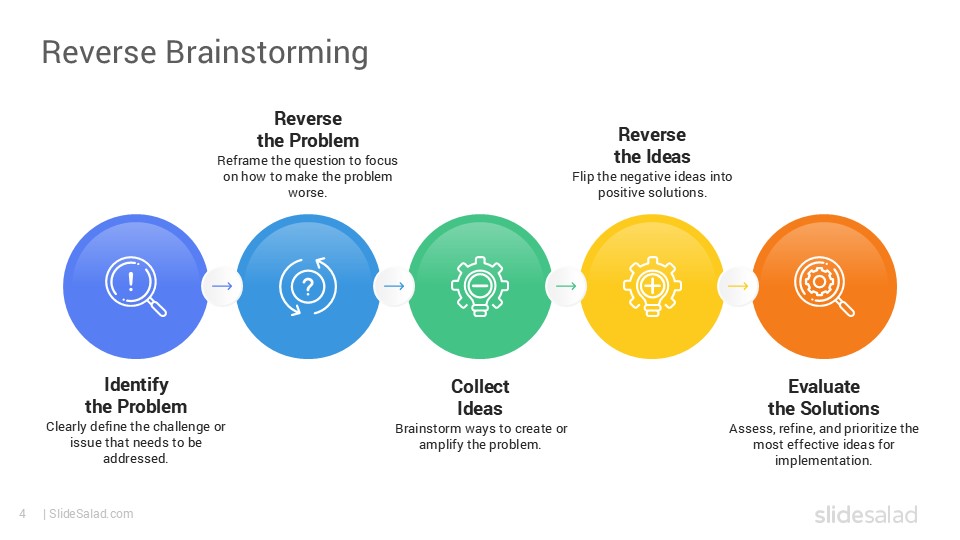
Reverse Brainstorming (also known as Negative Brainstorming) is a creative problem-solving technique where, instead of generating solutions, participants first think of ways to make a problem worse. This unconventional approach helps identify hidden challenges, uncover root causes, and spark innovative ideas. The Steps of Reverse Brainstorming are:
- Identify the Problem – Clearly define the challenge or issue that needs to be addressed.
- Reverse the Problem – Reframe the question to focus on how to make the problem worse.
- Collect Ideas – Brainstorm ways to create or amplify the problem.
- Reverse the Ideas – Flip the negative ideas into positive solutions.
- Evaluate the Solutions – Assess, refine, and prioritize the most effective ideas for implementation.
This collection of ready-to-use PPT graphic presentations of Reverse Brainstorming for PowerPoint contains 11 Creative and fully editable slides with many variations options. You can easily modify color themes, add your text, and resize and move the shapes and icons of each slide as per your requirement.
This template is available as a Google Slides Template:
Download Reverse Brainstorming Google Slides Template Here>
Key Features:
- 11 Unique & Creative PPT Slides
- 2 Aspect Ratio (4:3 & 16:9)
- Fully and easily editable content
- 125+ Stunning Premade Theme colors. (What this means?)
- 5500+ Vector Icons! Easily change size & color
- Unlimited Theme Colors
- One-click to change all colors to fully fit your brand’s color (What this means?)
- 100% Vector Objects & Icons
- Free Fonts and Icons







There are no reviews yet.